
What the old Order History Reports did
For years Amazon had a page at amazon.com/gp/b2b/reports where you chose a report type and a date range and got a CSV file back. Guides from that time describe four report types:
- Items — one row per product with title, category, seller, price and quantity. The default, and the one most people used.
- Orders and shipments — one row per order or shipment, including shipping charges and promotions.
- Refunds — money returned to you.
- Returns — items physically sent back.
Budget spreadsheets such as Tiller's and countless personal scripts were built around the Items report and its columns: Title, Category, Item Total and dates like 03/05/22.
What changed on 20 March 2023
After 20 March 2023 the page stopped working for personal accounts and showed a notice that Order History Reports are no longer available. Amazon Business accounts kept their own reports. Everyone else was pointed to the Your Orders page — fine for looking up an order, but without an export — and to Amazon's privacy data request.
The replacement: Request your data → Your Orders
Your complete order history now comes through Amazon's privacy tools. In short (the download guide has every step, timings and fixes):
- Open Request your data on the Amazon website for your country (Your Account → Data and Privacy).
- Choose Your Orders and submit the request.
- Click the confirmation link in Amazon's e-mail, then wait for the e-mail saying your data is ready — for Your Orders often within a few hours.
- Download the ZIP. It covers your whole account history; there is no date range to choose.
What arrives is not a report in the old sense. It is a ZIP of CSV files: physical orders in one file, digital orders, refunds and returns in others, with no totals and no category column for physical orders.
The February 2026 format change
Until early 2026 the orders file was Retail.OrderHistory.1.csv: 28 columns in a fixed order, every value in quotes, newest orders first. Around 19 February 2026 Amazon started sending Order History.csv instead, and members of the Tiller community listed the differences within days:
Before: Retail.OrderHistory.N.csv | Since Feb 2026: Order History.csv | |
|---|---|---|
| Column order | Fixed, starting with Website, Order ID, Order Date | Alphabetical, starting with ASIN |
| Amount paid | Total Owed | Total Amount |
| Quantity | Quantity | Original Quantity |
| Payment | Payment Instrument Type | Payment Method Type |
| Gift recipient | Gift Recipient Contact Details | Gift Recipient Contact |
| Quoting | Every value in quotes | Only where needed |
| Row order | Newest first | Not sorted by date |
Why Tiller-style imports broke
An importer that looks for a column by its exact name or position fails on a file like that. Tiller users reported that the CSV uploader no longer recognised the file, even after renaming columns by hand; community members then shared scripts that convert the new file back to the old layout, and later a replacement Google Sheets importer. Any home-made macro that expects Total Owed in a certain column has the same problem.
This viewer matches columns by name instead, ignoring case, spacing and punctuation. Total Owed, Total Amount and the old report's Item Total all end up in the same Total column, wherever they sit in the file. The column-by-column guide explains what each one means.
How to get a report-style table today
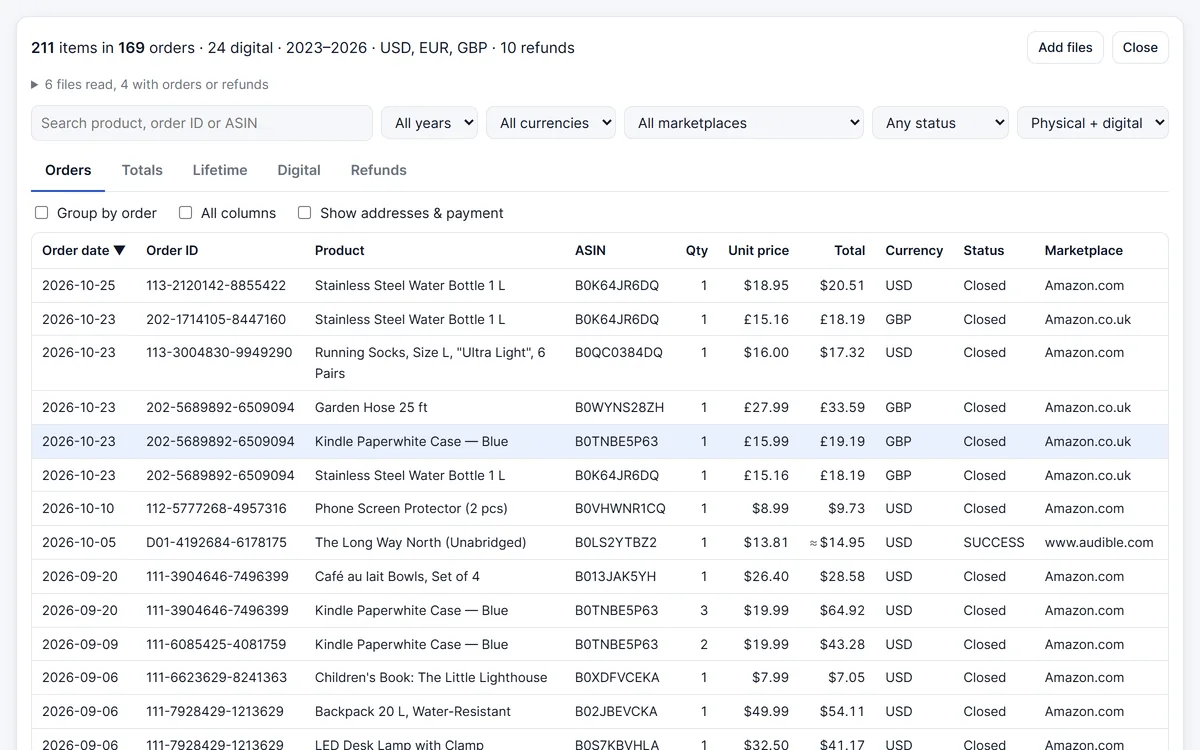
Drop the ZIP on the viewer below. You get what the old Items report gave you, plus the totals it never had:
- One row per item with date, order ID, product, ASIN, quantity, total, currency, status and marketplace — or one row per order with Group by order.
- Any period: pick a year in the filters, search for a product, sort any column.
- Totals per year and month on the Totals tab, in each currency separately.
- Digital orders and refunds from the other files of the ZIP, each in its own tab.
- Excel or CSV of exactly what you see, with real dates and numbers (more on the export).
Kept an Items report from before 2023? It still opens here, on its own or together with the new ZIP. If both cover the same period, the same orders count twice; the Lifetime tab warns when one order appears in two files.
Turn your Amazon export into a report
Drop your Your Orders.zip or order history CSV here
The ZIP (or CSV) from Amazon's Request your data → Your Orders. It is read by your browser and never uploaded. How to get it
Files
Spent = Amazon's per-item total (Total Owed / Total Amount): price × quantity + tax + shipping − discounts. ≈ marks rows computed because the total was empty. Details
Lifetime = physical + digital orders per currency, cancelled orders left out. Refunds are subtracted only in “Spent − refunds”, in the year they were issued. What is included
Digital orders come from the digital orders file of the export. Type is shown only when the file states it. How types are found
Refunds are matched to orders by Order ID; repeated rows count once. How refunds are matched
Frequently asked questions
Can I still get an Amazon order history report?
Not the old one, if you have a personal account — it was retired in March 2023. The Your Orders data request gives you the complete history as CSV files, and the viewer on this page turns them into a table with totals per year and an Excel export.
Do Amazon Business accounts still have order reports?
Yes, Amazon Business accounts kept their own reporting. This page is about personal accounts. The viewer also reads the old report's items CSV layout.
Why does my old import script fail on Order History.csv?
Since February 2026 the columns are in alphabetical order and four were renamed, including Total Owed → Total Amount and Quantity → Original Quantity. Scripts that rely on fixed names or positions need updating; the viewer finds columns by name, so it reads both layouts.
Can I get a report for one year only?
Amazon's data request always contains your whole history. Open it here, pick the year in the filters and download that year as Excel or CSV.